
Download PDF Scanner - Maker pdf look scaned – pdf scanner, pdf maker, scan document, convert to pdf, document scanner, scan to pdf, document to pdf, pdf converter, scan document to pdf, make pdf look scanned, digital document to pdf, scanned pdf, pdf tool, document scanner app, pdf utility, pdf maker app, document converter, scan to pdf app, make scanned pdf, digital to pdf
Overview
PDF Scanner - Maker pdf look scaned is a productivity-focused mobile application designed to transform digital documents into PDF files that emulate the authentic appearance of scanned documents. The app caters to users who require professional-looking PDFs without the need for physical scanning hardware. It is particularly useful for students, remote workers, and professionals managing digital paperwork who want to maintain a consistent, formal presentation across documents. By simulating the visual texture and imperfections of traditional scans—such as paper grain, slight shadows, and subtle color variations—the app enhances the realism of digital files.
Developed by Ryan J. Boudreaux, the application operates as a Progressive Web App (PWA), meaning it functions directly within the browser without requiring installation from an app store. This approach emphasizes privacy and data security, as all processing occurs locally on the user’s device. The app does not send files to external servers, ensuring sensitive information remains under user control. It is especially valuable in environments where data confidentiality is paramount, such as legal, medical, or financial sectors.
Real-world use cases include preparing academic submissions, creating official-looking reports, or converting digital drafts into presentation-ready documents. The tool fills a niche in the mobile productivity ecosystem by offering a secure, fast, and visually accurate document transformation process. Its focus on realism and privacy positions it as a compelling alternative to traditional scanning apps that may compromise user data.
Key Features & Functionality
- Privacy-Focused Processing: All document conversion happens directly in the user’s browser. No files are uploaded to servers, ensuring complete data privacy and compliance with strict confidentiality standards.
- Offline Functionality: As a PWA, the app can be used without an internet connection, enabling document conversion in remote or low-connectivity areas.
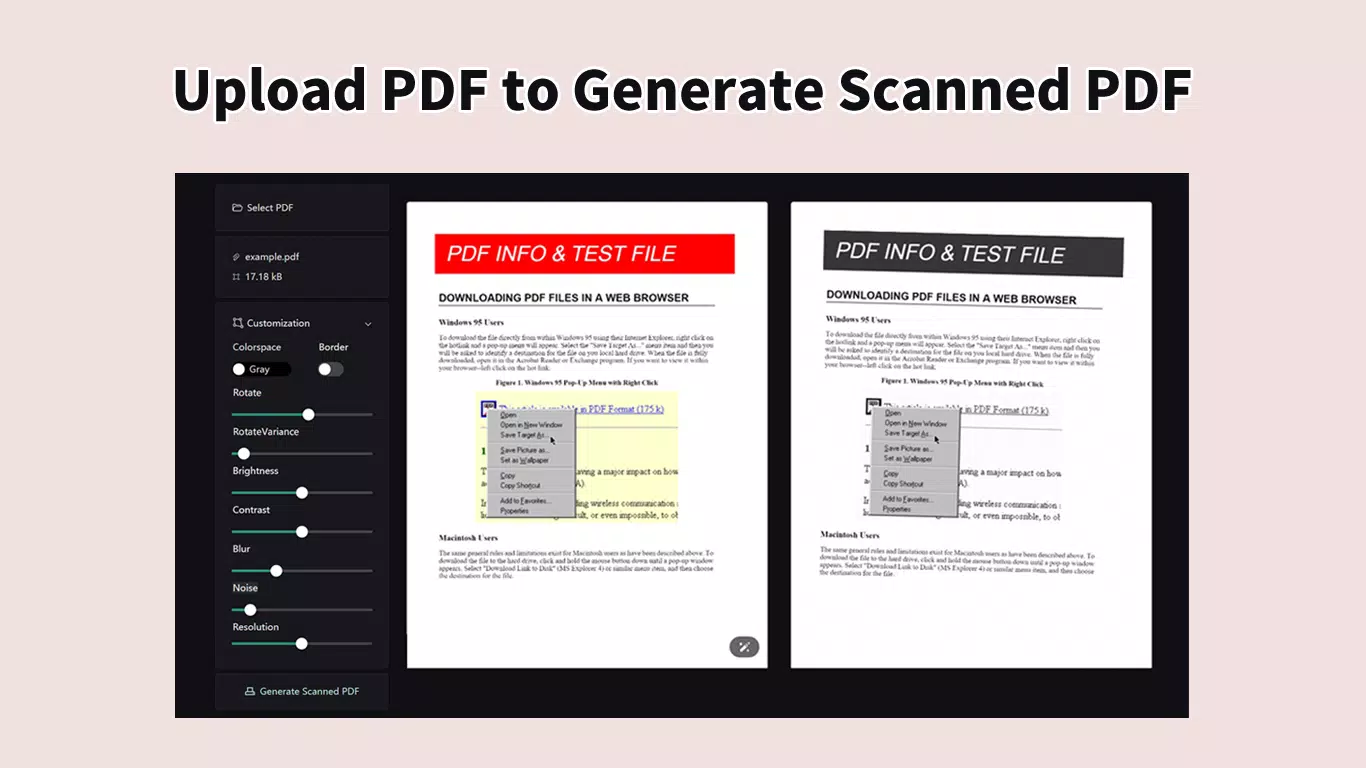
- Real-Time Preview (WYSIWYG): Users can view the scanned PDF output instantly, side by side with the original, allowing immediate visual feedback and adjustments.
- Lightning-Fast Scanning: Powered by WebAssembly technology, the app delivers near-instant conversion, significantly reducing wait times and improving workflow efficiency.
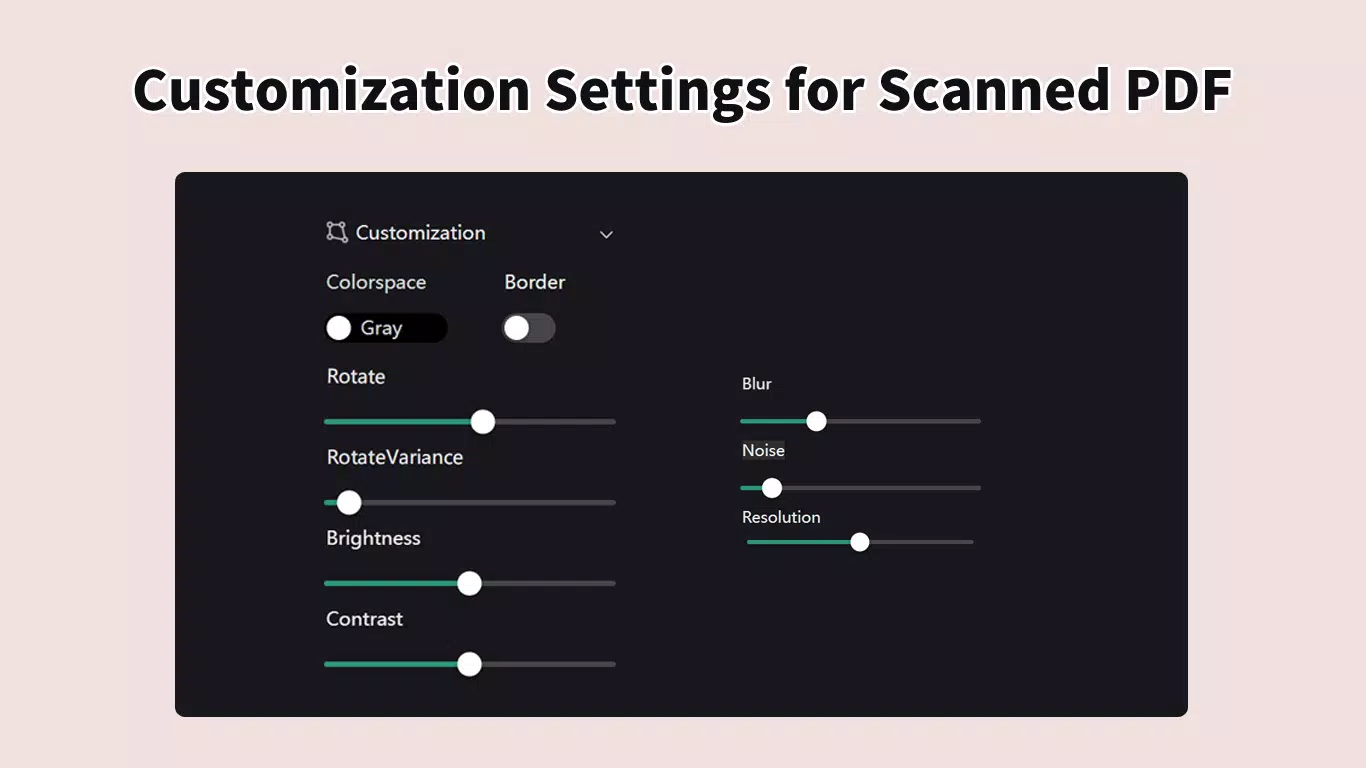
- Customizable Appearance Settings: Users can adjust parameters such as paper texture, shadow intensity, and color tone to tailor the scanned look to specific needs or branding requirements.
- Browser-Based Operation: No installation required—users access the app directly through their mobile browser, reducing device storage usage and simplifying updates.
For example, a student preparing a research paper can use the app to convert a digital draft into a scanned-style PDF, giving it a formal, archival appearance suitable for submission. Similarly, a freelancer can generate client-ready documents that mimic physical submissions, enhancing professionalism. The real-time preview ensures that adjustments are visible immediately, minimizing trial and error. The app’s lightweight nature and fast processing make it ideal for users who prioritize speed and security over extensive feature sets.
Interface, UX & Performance
The user interface of PDF Scanner - Maker pdf look scaned is designed with simplicity and clarity in mind. The layout follows a clean, minimalistic approach, focusing on core functionality without clutter. Navigation is intuitive, guiding users through the document upload, preview, and export process with minimal steps. The app’s design emphasizes visual feedback, with clear indicators for file status, processing progress, and export options.
Users can expect smooth responsiveness during file processing, thanks to the use of WebAssembly for optimized performance. Although the developer did not list formal performance metrics, the app’s design suggests efficient handling of medium-sized documents. The real-time preview feature contributes to a seamless experience, allowing users to confirm results instantly. Stability appears strong, as the app runs entirely in the browser environment, reducing the risk of crashes associated with native app bugs.
Performance across device categories is likely consistent, given the browser-based architecture. However, specific requirements were not listed. Users on older Android devices may experience varying load times depending on available RAM and processing power. Overall, the app maintains a high level of usability and reliability, particularly for users who value speed and a distraction-free interface. The absence of ads or in-app purchases further enhances the user experience.
Platform Compatibility & Technical Requirements
PDF Scanner - Maker pdf look scaned is available on the Android platform and is compatible with devices running the latest Android OS versions. The app has a file size of 24.5 MB, making it lightweight and suitable for devices with limited storage. It is currently available in version 1.0.0 and is offered at no cost to users.
As a Progressive Web App, the app does not require installation from the Google Play Store. Instead, it can be accessed directly through a mobile browser. This approach reduces dependency on app store ecosystems and allows for faster deployment of updates. However, the developer did not specify minimum OS requirements or device compatibility details. Users should ensure their Android device supports modern web standards, including WebAssembly and service workers, to fully utilize the app’s features.
Compatibility with iOS devices was not disclosed. While some PWAs may function on iOS, full functionality cannot be guaranteed without official confirmation. Users should verify browser support and system requirements before attempting to use the app on non-Android platforms.
Pros and Cons
Pros
- Privacy-first design with no file uploads to servers
- Works offline, ideal for low-connectivity environments
- Real-time preview for immediate visual confirmation
- Lightning-fast processing powered by WebAssembly
- Customizable scan appearance to match desired visual style
- Free to use with no ads or in-app purchases
Cons
- Platform availability limited to Android (iOS compatibility not confirmed)
- Specific technical requirements were not disclosed
- No in-app support or user documentation provided
- Dependent on browser capabilities for full functionality
- No official app store listing for easier access
FAQ
Is PDF Scanner - Maker pdf look scaned safe to use?
Yes. The app processes all files directly in your browser, with no data sent to external servers. Your documents remain on your device at all times, ensuring maximum privacy and security.
Can I use this app without an internet connection?
Yes. As a Progressive Web App, PDF Scanner - Maker pdf look scaned supports offline functionality, allowing you to convert documents even without an active internet connection.
Is the app available for iOS devices?
Compatibility with iOS was not specified. While some PWAs may work on iOS, full functionality cannot be guaranteed without official support from the developer.
Do I need to install anything to use the app?
No. The app runs directly in your mobile browser. You do not need to download or install it from an app store.
How often is the app updated?
Updates are likely delivered automatically through the web platform. However, the developer did not provide specific details about update frequency or release schedule.
Final Thoughts
PDF Scanner - Maker pdf look scaned stands out in the crowded productivity app market by combining speed, privacy, and visual authenticity. Its browser-based architecture ensures that sensitive documents remain secure, while its real-time preview and customization options empower users to create professional-looking scanned PDFs with ease. The app is ideal for students, freelancers, and professionals who need to present digital documents with a formal, archival appearance.
Despite its limited platform availability and lack of detailed technical specifications, the app delivers a reliable, ad-free experience that prioritizes user privacy and efficiency. For those seeking a lightweight, secure tool to convert digital files into scanned-style PDFs, this app offers a compelling solution.
Download PDF Scanner - Maker pdf look scaned now


